
Testimonials

"The latest version of Sports Sounds Pro is fantastic. I passed your new version [info] to my friend at the High School and he is delighted to use it. He was telling another friend, an announcer for the Kansas State Jay Hawks about it, and he already had it! Thanks again for all your excellent work."

    -J.W.

Get the Flash Player to see this player.
JGMJ Women's Conference at the United Center Chicago, Chicago, Illinois
Sports Sounds Pro
Spors Sounds Pro running on TWO laptops!
Announcer Tom Gear at NJCAA Div. II Womens Basketball finals March 15-18, 2006
ECHL Hockey League - Kelly Cup Finals

Features PDF Print E-mail

SportsSoundsPro is in it's NINTH year of competing with $10,000 systems! Check out this list of features:


  • 8,640 Sound buttons
  • All sound buttons are user settable
  • Custom Cue Control
  • Instant Play Feature
  • A Page Library allowing easy Importing and Exporting Pages
  • Color-coded backgrounds
  • Easy to use and friendly user interface
  • Two styles of sound level meters (Panel or Bar)
  • Direct X technology
  • Output device selection (for those with multiple sound cards)
  • User configuration options like colors, sample rate, output device selection
  • Master Volume Control
  • Individual Volume Level Settings
  • Loop sounds - manual selection
  • Loop sound - can be assigned and saved
  • Plays FLAC, mp3, mp2, mp1, ogg, wav, btw, and wma files
  • Any of the 180 pages can be made into a Playlist
  • Hot Keys and Hot Key Management Tools
    Hot Key Indicator, Pop-up hot key assignment reminders, Hot Key list functions
  • Hot Key Keyboard map
  • Digital Signal Processing (DSP) - Ten Band Equalizer
  • Digital Signal Processing (DSP) - Reverb control
  • Digital Signal Processing (DSP) - Tempo control
  • Digital Signal Processing (DSP) - Pitch control
  • Log File
  • Faders (Fade In, Fade Out, and Cross-Fade)
  • Faders can be automatic or manual
  • Faders can optionally work on Hot Keys
  • Adjustable Fade Rates
  • Adjustable Fade begin positions for automatic fades
  • Separate Fade rates for Pause
  • Adjustable Page and Sound Button Fonts, Color, and Size
  • Visual Sound Progression Bar
  • Highlight Sound Buttons
  • Locate sounds easily with the FIND feature
  • FIND will search sound buttons and/or Notes, option set by user.
  • Copy, Cut, and Paste for Sound Buttons
  • Copy, Cut, and Paste for Pages
  • Sound Buttons can be dragged and dropped
  • Pages can be dragged and dropped
  • A SHUFFLE mode available for all Play List pages
  • Game Clock and separate Timer
  • Automatic Timed Start capability
  • Ability to start and move around anywhere within a sound file
  • The ability to populate multiple sound buttons from multiple files
  • Not enough room in the button for all your text...
    You can append Notes to each sound button.
  • "Talk" Button
  • Dynamic Cue
  • Multi-Play (up to five different sounds)
  • Full Screen display (resizeable)
  • Selectable Mono or Stereo mode


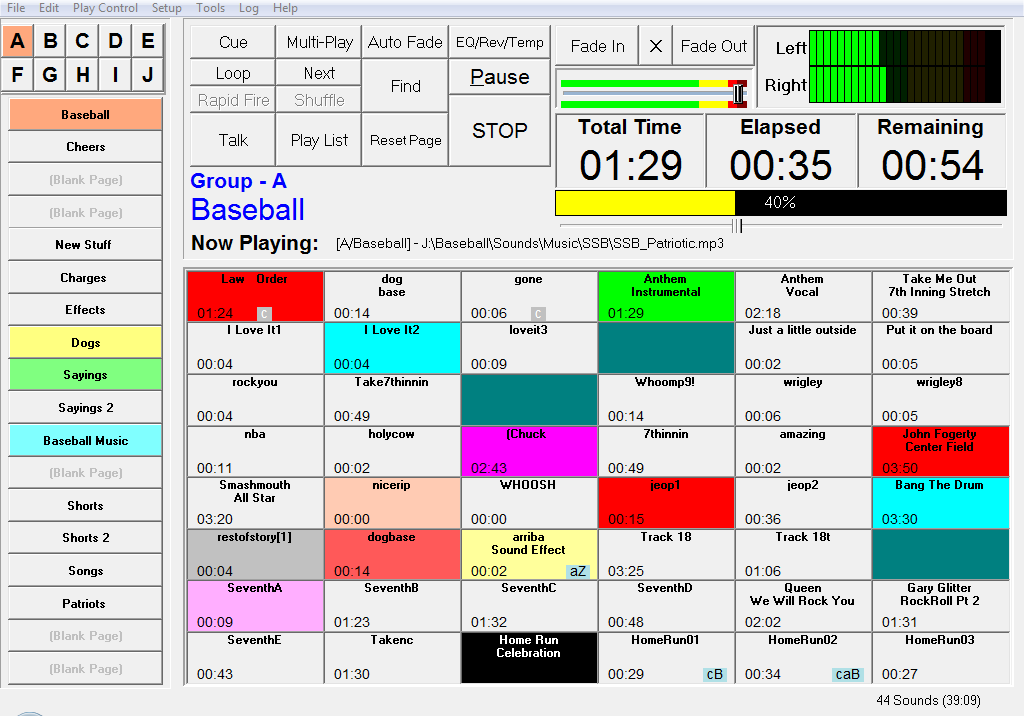
SportsSoundsPro Screen Shot 1

Last Updated on Wednesday, 30 September 2009 15:54
 

Copyright © 2010 Sports Sounds Pro. All Rights Reserved.
Outer Banks Wedding Photography