
Testimonials

"...I had my radio show last Saturday, it was extremely tech heavy, and there was no way I could have done it without that program (Sports Sounds Pro)...you truly turned out an impressive program..."

Get the Flash Player to see this player.
JGMJ Women's Conference at the United Center Chicago, Chicago, Illinois
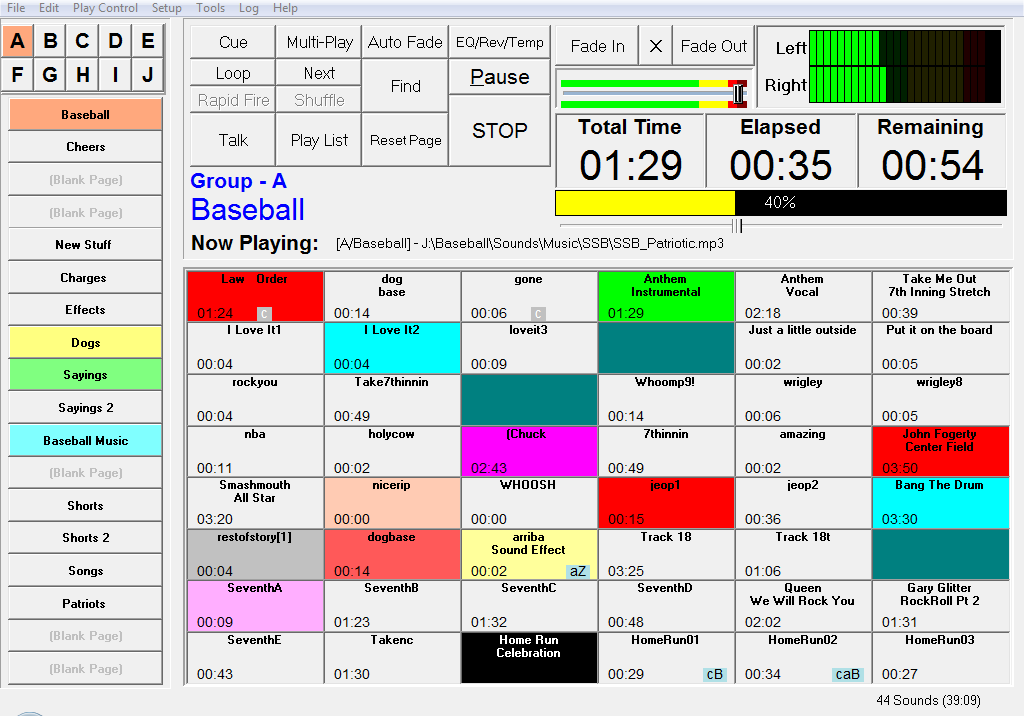
Sports Sounds Pro
Spors Sounds Pro running on TWO laptops!
Announcer Tom Gear at NJCAA Div. II Womens Basketball finals March 15-18, 2006
ECHL Hockey League - Kelly Cup Finals

Home Download Latest Version
Download Lastest Version of Sports Sounds Pro Now


NOTICE #1: Updates:

Sports Sounds Pro is constantly being improved. As new refinements and/or features are coded, the updated version will be posted to this web site. Make sure you check this site often to download the latest version. Your Registration Key will continue to work with these new versions.

NOTICE #2: Zip or EXE:

You now have the option of downloading a zip copy of Sports Sounds Pro. Some users have been experiencing firewall (security) problems trying to download an .exe file. The .zip file gets around that problem.

NOTICE #3: Download Problems

If you get a message saying the downloaded files are corrupt when you try to install, this normally means your download did not download the complete file. Check its size, it should be over 900 kb. You may have to try several times before you get a good download of the entire file.

Use the following downloads for existing Sports Sounds Pro Users.

Sports Sounds Pro 6.0 (Build 7) - exe file

Sports Sounds Pro 6.0 (Build 7) - zip file

Windows Vista, Windows 7, and NEW users, Please use the following installs - PLEASE READ NOTES BELOW:

Sports Sounds Pro 6.0 (Build 7) - exe file

Sports Sounds Pro 6.0 (Build 7) - zip file


Notes for Vista and Windows 7 Users:

Starting with Vista, Windows has undertaken a number of measures to increase security. One of them is to not allow any programs to write into the Program Files directory. This is where previous versions of Sports Sounds Pro installed itself (C:\Program Files\SportsSoundsPro). The two Vista and Windows 7  installs, install Sports Sounds Pro in (C:\SportsSoundsPro) folder and bypasses putting the program in the Program Files folder.

Some users of Vista have experienced problems installing to the Program Files folder (mostly Vista Home users). Vista uses a technique called Virtualization where they actually re-route writes to the Program Files folder. Microsoft has stated that this is a temporary fix to enable legacy systems to continue operating but they will not guarantee that it will not be removed in future Windows releases.

Sports Sounds Pro (SSP) has two files that it writes to. One is your .set file which contains your sound buttons and the other one is a file named SS.ini which contains all your settings. If you are an existing user of SSP and want to prepare for future Windows installation, then use this set of downloads and installs. You will have to copy over the SS.ini file and your .set file from the folder they are in now to the folder in which you install SSP.

SSP will eventually switch over to using the Vista and Windows 7 install set only at some point in the future.

INSTALLATION INSTRUCTIONS:

The file you download is called "InstallSportsSoundsPro607.exe" or "InstallSportssoundsPro607V.exe". Run it and it will install Sports Sounds Pro in a directory called SportsSoundsPro.

It will also place a shortcut on your desktop. If you already have a version of Sports Sounds Pro then this will overlay that version and maintain all your button setting. You need not do anything.

If you already have an earlier version of Sports Sounds (prior to version 4.0.1), then copy over the SS.ini file from your old Sports Sounds directory along with any .set files, this will maintain your registration key and sound button assignments.

Moving Sports Sounds Pro to Another Computer:

The file you downloaded, "InstallSportsSoundsPro607.exe" is small enough to fit on a floppy disk. Copy it to a floppy or a flash stick and then copy it to the computer you want to install it on. Run it and it will install Sports Sounds Pro on that computer. Then enter your registration code and you are ready to go.


Last Updated on Thursday, 06 May 2010 15:43
 

Copyright © 2010 Sports Sounds Pro. All Rights Reserved.
Outer Banks Wedding Photography