|
Sports Sounds Pro Runs Under Windows 8 |
|
Release 6.0 Build 11 - February 29, 2012:
- There were some internal calculations using decimal points that were added in Release 6.09 and these were causing major problems with European users since they use a comma to indicate decimals. The calculations have been rewritten so that they no longer use imbedded decimal points.
Release 6.0 Build 10 - February 17, 2012:
- In Multi-Play Mode, the timer display and progression bar were turned off in Build 08, they have now been turned back on due to numerous user requests.
Release 6.0 Build 9 - February 05, 2012:
This release fixes two bugs and adds a new feature: - When you would right click on the Cue page button and select "Clear Cue", buttons with a Custom Cue Flag were not clearing the flags and in some cases all blank buttons had the Custom Cue Flag. If you clicked on another page and then back to the Cue, the Cue page was cleared. This has now been corrected. - Both the bar and panel meter displays have now been coupled with the volume control. e.g. If you reduce the volume by 50% then the meters will read half of what they did at 100%. - Some users who run in Mono mode discovered that the cue points they set in Custom Cue Control were not working properly. Research showed that the position counter in Mono mode is not the same as the position counter in Stereo mode. To correct this, Sports Sounds Pro now saves all cued Start and End position Cues as if they were Stereo. When you run in Mono mode, Sports Sounds Pro applies an algorthrim to convert the Start and End Custom Cue Control positions to reflect the proper value in Mono mode.
|
|
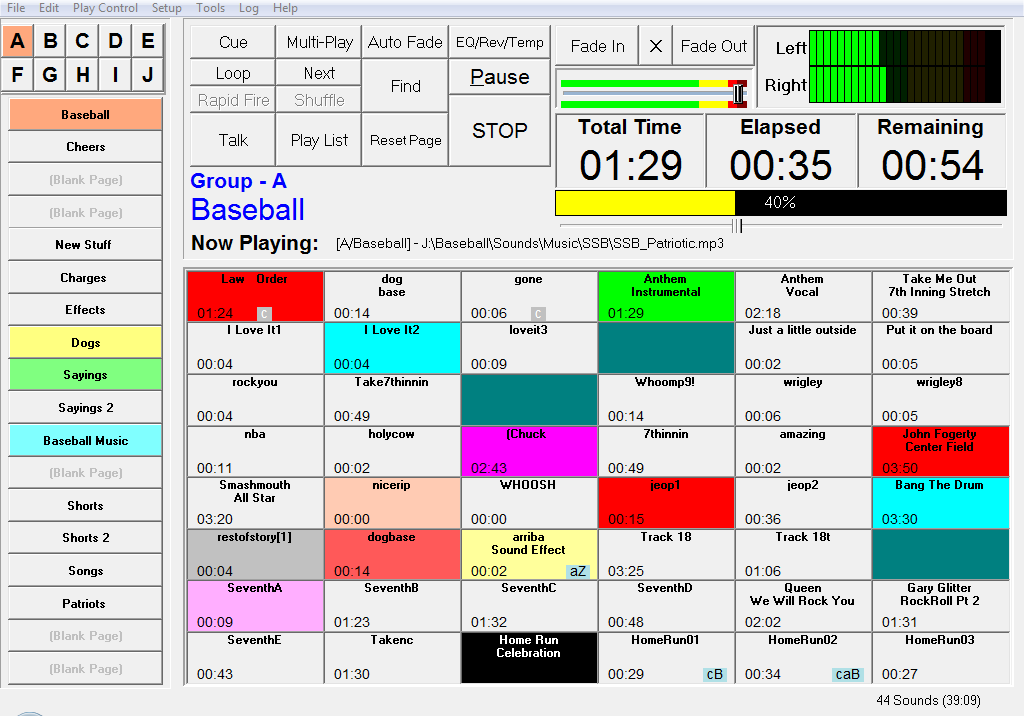
SportsSoundsPro is in it's 13th year of competing with $10,000 systems! Check out this list of features:

-
-
-
-
- 8,640 Sound buttons
- All sound buttons are user settable
- Custom Cue Control
- Instant Play Feature
- Color-coded backgrounds
- Easy to use and friendly user interface
|
|
Read more...
|
|
|
|
|
<< Start < Prev 1 2 Next > End >>
|
|
Page 1 of 2 |